Everypassword.Onecalmplace.
Cove organizes passwords, developer secrets, and offline credentials into one encrypted vault — then finds anything back in a fraction of a second, typos and all.
AES-GCM encryption
Credential types
Plaintext secrets stored
The real problem
Passwords don't fail loudly. They fail quietly, everywhere.
None of these are dramatic. They're just the small, accumulating friction of managing a digital life without a system built for it.
Forgotten passwords
You reuse the same three passwords everywhere because remembering forty unique ones was never realistic in the first place.
Scattered credentials
Some logins live in your browser, some in a notes app, some in your head, and a few only your muscle memory remembers.
Insecure notes
That plaintext note titled "passwords (do not delete)" has been one synced backup away from disaster for years.
Lost recovery codes
The 10 backup codes you screenshotted during 2FA setup are buried three folders deep — if they still exist at all.
Developer secrets everywhere
SSH keys, API tokens, and .env values end up in Slack messages, random text files, and repos they should never touch.
Offline credentials, ignored
Router admin logins, office WiFi, server room doors — the credentials with no website still need a home too.
Fragile digital identity
Security questions, recovery emails, and backup phones are the last line of defense — and usually the least organized.
Sound familiar?
Every one of these is solved by the same underlying idea: a vault that thinks alongside you instead of demanding perfect discipline.
How Cove solves it
Nine ideas, one philosophy: think alongside the user.
Every capability below exists to remove a decision you'd otherwise have to make manually.
Search that actually understands you
Type "old GitHub password" or "archived banking" and get exactly that — typo-tolerant, natural-language, instant.
Fuzzy matching forgives typos, natural-language parsing understands intent, and inline filter chips let you refine without ever leaving the search box.
Before / after
Drag to see the difference
This is the same information — just before and after it has a home.
Before — scattered everywhere
gmail pw: Summer2019!! (or is it 2020?)
aws — ask Dave, he has it saved somewhere
router admin: admin/admin probably
notes app: "bank stuff — DO NOT DELETE"
github: same as netflix i think???
recovery codes.txt — last modified 2022
sticky note on monitor: office wifi
After — organized in Cove
GitHub
Strong · Development
AWS Production
Strong · Infrastructure
Office WiFi
Offline credential
Deploy key — prod
SSH · Development
Bank recovery Qs
4 questions saved
Netflix
Unique · Entertainment
Drag the handle left and right
How it works
Four steps. Then it stays out of your way.
No migration project, no browser extension to trust, no key ceremony. Add a secret and Cove handles the rest.
- 1~30 seconds
Create your vault
One account, one master password. It's bcrypt-hashed and never doubles as the key to anything inside.
- 2Paste or upload
Add a secret
Paste an API key, or drop in an SSH keypair, a TLS bundle, a service-account JSON, or a .env file. Cove already knows which files each type accepts.
- 3AES-256-GCM
Encrypted before it lands
AES-256-GCM runs before anything reaches storage. Postgres holds ciphertext; S3 holds ciphertext. Neither ever sees a readable byte.
- 4Instant
Find it, read it, use it
Search tolerates typos. Certificates show their expiry, spreadsheets render as tables, .env files as key–value pairs — no downloading to look something up.
One app, every screen
Desktop-grade, mobile-first.
Bottom navigation, swipe actions, and an installable PWA on mobile — the full sidebar layout on desktop. Same speed, same vault, same encryption.
Product tour
Four screens you'll actually live in.
Real screenshots from the running app — not mockups, and not a roadmap.
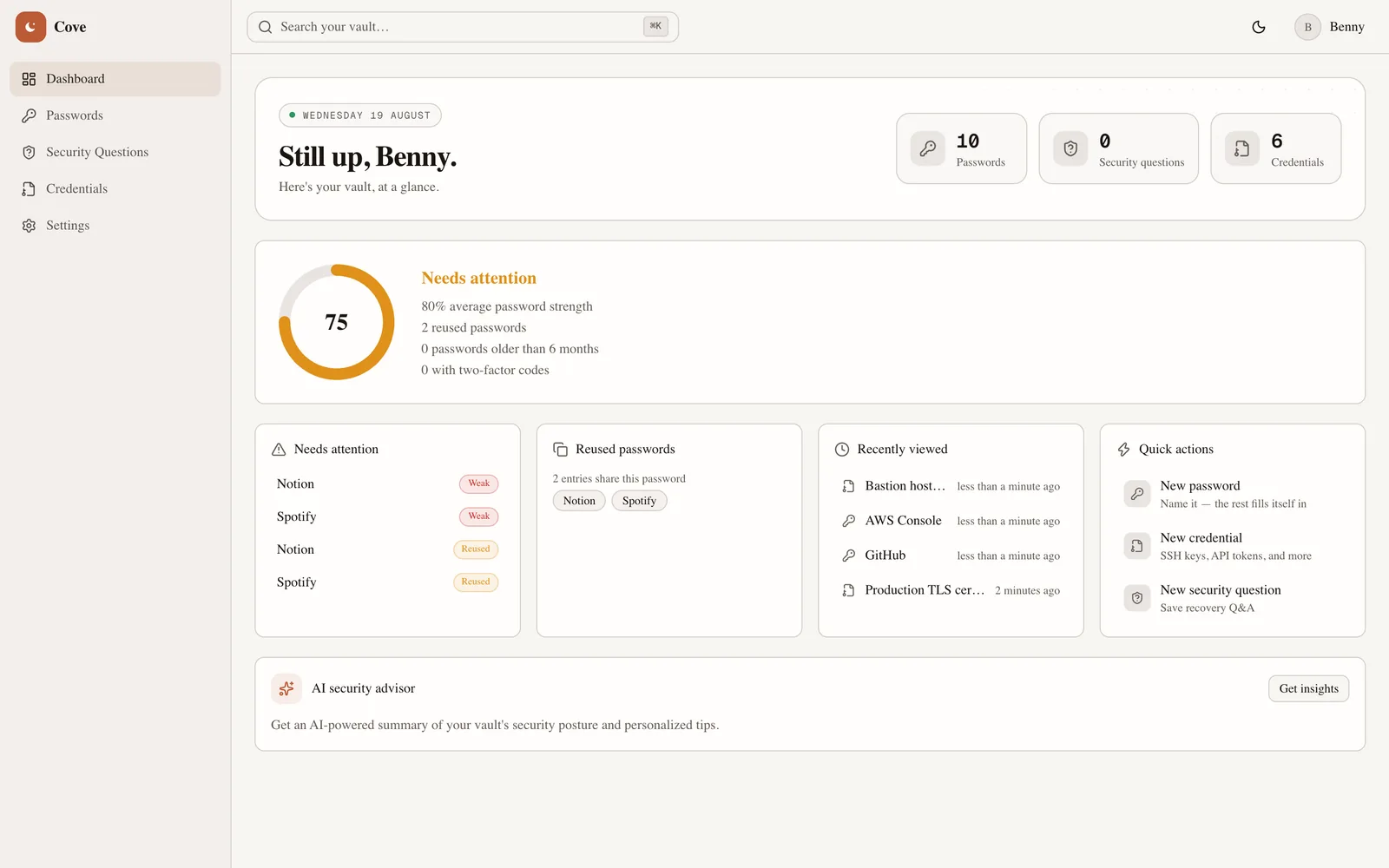
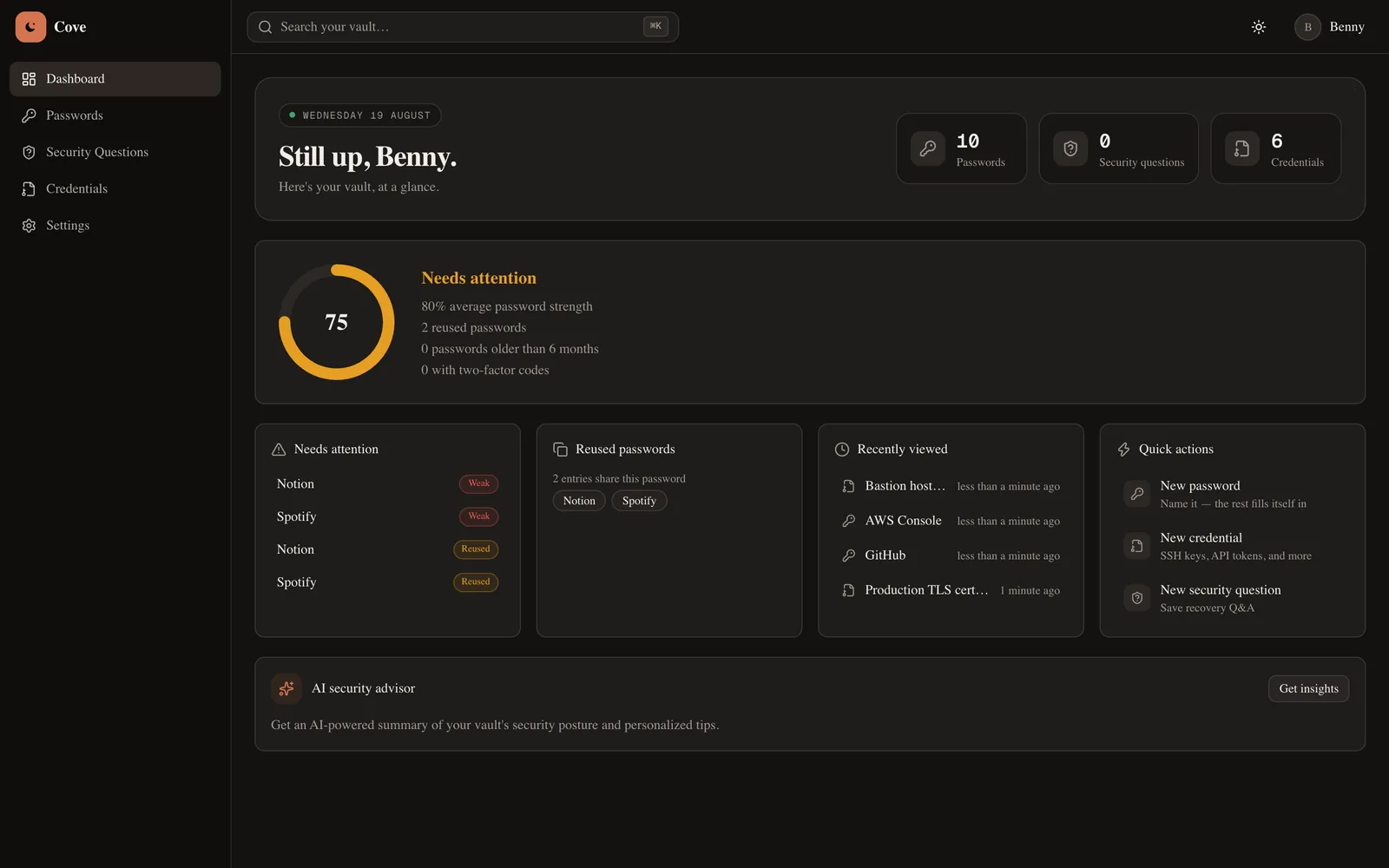
Vault health at a glance
One score built from password strength, reuse, and age — with the specific entries dragging it down listed right beside it, not buried in a report.
Architecture
Where your secret actually goes.
Four stages between the file picker and storage. Nothing readable survives past the third.
Your browser
Upload or paste
The file never touches disk on the way — it streams straight into the request.
Type validation
Rules enforced server-side
An SSH-key entry accepts a keypair and nothing else. The same rule table drives the browser and the API.
AES-256-GCM
Encrypt + authenticate
A fresh IV per file. The auth tag makes tampering a decryption failure, not a silent corruption.
Object storage
Ciphertext only
S3 receives an opaque blob with a meaningless key. A bucket leak yields nothing readable.
Postgres stores the metadata
Filename, size, type, and a SHA-256 checksum of the plaintext — enough to list and verify a file, never enough to reconstruct one.
No presigned URLs, by design
Because encryption happens before upload, downloads are proxied and decrypted per request. S3 never hands out a readable object because it never holds one.
Security philosophy
Encryption isn't a feature here. It's the foundation.
Trust isn't a claim — it's an architecture. Here's exactly how your data is protected, in plain terms.
Field-level AES-256-GCM
Every sensitive field is individually encrypted before it touches storage — not the whole row, the field.
Passwords never stored twice
Your login password is bcrypt-hashed, one-way. It's never the same secret as anything inside your vault.
No plaintext, at rest or cached
The offline app shell never caches decrypted vault data — only static assets and navigation.
Fingerprinted, not exposed
Duplicate-password detection compares one-way hashes — the system flags reuse without ever reading the value.
Modular by construction
Every feature follows the same controller → service → repository pattern, so security review scales with the code.
Developer experience
The rules are in the source, not the marketing.
Cove treats a keypair as a keypair, not as a blob of text you have to remember the shape of. Here is the code that makes that true.
src/lib/credential-types.ts
// A keypair is two files: the private key and its .pub
// counterpart. OpenSSH private keys ship with no extension,
// hence allowExtensionless.
SSH_KEY: {
inputMode: "FILE",
extensions: ["pub", "pem", "key", "ppk", "ed25519"],
allowExtensionless: true,
maxFiles: 2,
maxBytes: 1 * MB,
hint: "Private key and its .pub counterpart — up to 2 files.",
},
One table decides what each credential type accepts. The file picker, the browser-side guard, and the server validator all read it — so they cannot disagree.
Type-aware, not type-agnostic
Every credential type declares which extensions it accepts and how many files it holds. A hand-crafted request can't attach an executable to an SSH-key entry — the server checks the same table the browser did.
Previews that understand the format
Certificates decode to subject, SANs, and days-until-expiry. Spreadsheets render as tables with pinned headers. .env files become key–value rows with secrets masked individually.
Integrity checked on every read
A SHA-256 of the plaintext is recorded at upload and verified on download — on top of the GCM auth tag that already makes tampering fail loudly rather than silently.
Your key, your call
ENCRYPTION_KEY lives in your environment, never in the database. Self-host the whole thing; the bucket and the database are both yours.
AI-first, not AI-decorated
Intelligence woven into every workflow.
Hover a capability to see how it actually works under the hood.
Contextual icon intelligence
Type "Home WiFi" — get a WiFi icon. No website required.
Natural-language search
"Archived banking passwords" just works.
Cross-entity vault health
One score across passwords, credentials, and security questions.
AI-generated icon options
Pick from real generated artwork, not a generic globe.
Auto-categorization
Categories resolve themselves as you type.
Built for how you actually work
One vault, shaped by whoever's using it.
The underlying system is the same — what it surfaces first adapts to what you actually need.
Developers
SSH keys, API tokens, and .env values — finally somewhere sane.
- Auto-classifies credential type from the name you type
- Monospace everywhere a secret actually looks like a secret
- Search "SSH keys" or "expired licenses" and get exactly that
Professionals
Client logins and vendor portals without the shared spreadsheet.
- Categories and tags keep dozens of client accounts untangled
- Security questions and recovery details live next to the login
- Vault health flags anything stale before it becomes a problem
Students
One place for every course portal, library login, and campus WiFi.
- Free-tier friendly — no paywall on core organization
- Offline credentials (dorm WiFi, printer login) get real icons too
- Password generator means no more "Fall2024!" everywhere
Freelancers
Every client, platform, and invoicing tool — organized like a business.
- Favorite your active clients, archive the ones you've wrapped
- Duplicate-password detection before a reused password bites you
- Fast enough to actually use before a client call, not after
Families
Router admin, streaming logins, and the WiFi password everyone asks for.
- Offline credentials for the things with no website at all
- One calm place instead of a sticky note on the router
- Built to extend to shared/family vaults as the product grows
How it compares
Not a spreadsheet. Not a legacy vault either.
A neutral look at where Cove sits against a typical password manager and the sticky-note-and-spreadsheet approach most people actually use.
| Feature | Cove | Typical password manager | Notes & spreadsheets |
|---|---|---|---|
| Field-level AES-256-GCM encryption | |||
| Typo-tolerant natural-language search | |||
| Automatic platform icon recognition | Partial | ||
| Offline credential icons (no URL needed) | |||
| Developer secret types (SSH, API, .env) | Partial | ||
| Encrypted file uploads (keys, certs, .env) | Partial | ||
| In-app previews for certs, CSV & spreadsheets | |||
| Vault health & duplicate detection | Partial | ||
| Installable mobile-first PWA | Partial | ||
| Works fully offline | App shell only | Varies |
Roadmap
Where Cove is headed next.
Shipped
AI-first omnisearch
Typo-tolerant, natural-language search with inline filter suggestions across your whole vault.
Shipped
Contextual & AI-generated icons
Automatic icons for offline credentials, plus AI-generated custom icon options.
Shipped
Encrypted file storage
SSH keys, certificates, service-account JSON, .env files, and spreadsheets — encrypted client-side of storage, with format-aware previews.
In progress
Vault health, expanded
Cross-entity scoring across passwords, credentials, and security questions in one number.
Planned
Shared & family vaults
Controlled sharing of specific entries without exposing your entire vault.
Planned
Browser extension
Autofill and one-click save directly from the sites you're already logging into.
Planned
Encrypted documents module
Government IDs and scanned records with OCR extraction, on the same storage pipeline the credential vault already uses.
Questions
Everything you'd ask before trusting us with a password.
Every sensitive field — passwords, notes, TOTP secrets, credential content — is encrypted with AES-256-GCM before it ever reaches the database. Login passwords are separately hashed and never stored or transmitted in reversible form.
Your vault takes about ninety seconds to set up.
No credit card. No import obligation. Just one encrypted place for everything, starting today.